An operating system is key program that manages all software and hardware.
The operating system controls all files and acts like a middle man and insures everything interacts correctly with each other.
Windows, Mac, Linux and Unix are the top grossing operating systems. All based off same concept and all have different advantages and disadvantages.
4 essential parts to run an operating system is a process manager, memory manager, file manager, and a device manager.
Memory manager looks after RAM and scans for memory space when requested and allows allocation of memory space, memory space may also need to be deallocated.
The process manager is in control of the CPU. It is necessary that it keeps track of the order of each process and the instructions in it. The process manager handles each job as they enter the process.
The device manager monitors each device, channel, and control unit.
File manager is in charge of the file directories and organisation. It checks every type of file that is on the system such as data files, program files, compilers, and installed applications. It keeps track of what the file does such as read, write, or execute. The file manager also sets permission for what users can and can’t see.
A network manager is a notable mention which allows users to share hardware and software between each other while also controlling the users access to them.
We use the User Interface which is controlled by the operating system to understand what is happening within it and allows us to interact with the operating system and managers.
The top 4 operating systems as of July 2019 is windows 10 in first at %58.95, then there is windows 7 in second at %16.78, then there is MacOS in third at %10.18, and lastly Linux in fourth at %7.05.
Some good features of windows 10 is that firstly the start menu is back. Secondly it will change the way it looks depending on the device you are using. At the third place it is the universal apps where the app scales to the device you are using. For number 4 is Cortana with a built in assistant. For fifth place there is an action sensor for notifications. Number six is face detection. Number 7 is the window snap where you can snap the application windows to the side of the screen top multitask. Number 8 is reserved for the edge browser that keeps the tabs memory open and a pen tool to draw on web pages you are browsing. Number 9 is Xbox streaming where you can stream your Xbox games to your PC and play with your controller. Number 10 is that it was completely free if you upgraded from past versions.
10 reasons why MacOS is the better operating system. Number one is the ecosystem it has created, with how you can have a phone computer and watch with all data being synchronised, and with the first hand peripherals that just work such as the air pods where it works first try and airdrop with the wireless quick file transfer. Virtual windows manager that can create secondary desktops, the track pad is created really well as well. Number three is the spotlight that is a built in virtual assistant that can help with most tasks. Number 4 is the ready to run experience which includes apps to help your experience, with also being able to remember details and fill in forms automatically. Number five is the boot camp, with the compatibility of between the operating systems. Number six is that it is based off of Unix which is a very optimised operating system and which is why it runs very smoothly. Number seven is that apple has some exclusives that can only be owned on Mac. Number eight is accessories that can be purchased and customised. Number nine is that apple product costs more but it doesn’t push ads upon you. Number ten is the liability, with the use of time machine and the access of previous versions of files.
To make a backup you first must run power shell as an admin. then you will need to type “wbadmin start backup -backuptarget:G: -include:C:\xampp -allcritical” which will create a backup of the xampp folder in the C drive to the G drive.
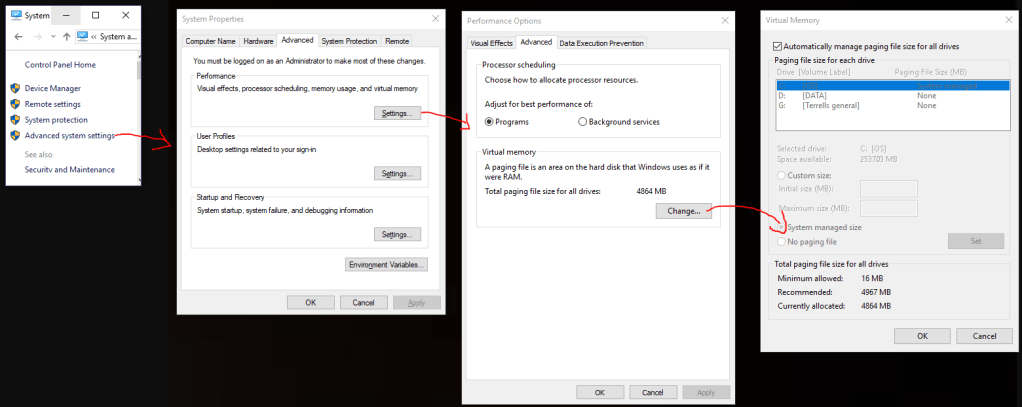
To designate virtual memory on your computer you must go to system settings firstly and then go to advanced system settings and run as admin, then you click on advanced, then the top settings button, and then advanced once again, then click change, untick the box at the top and then set your custom virtual memory amounts.
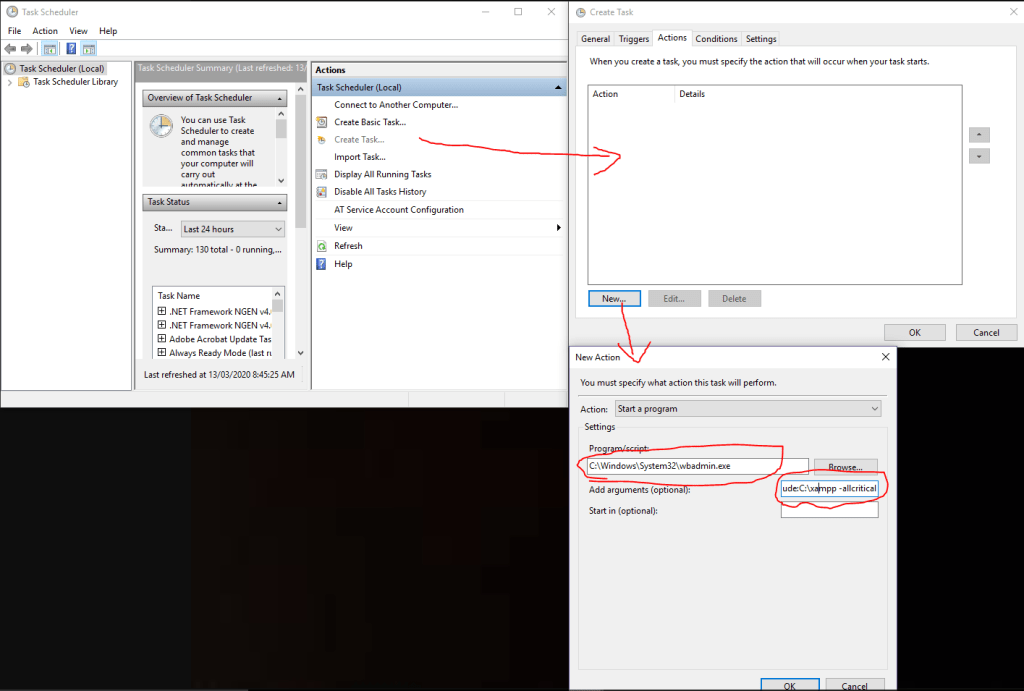
To set up a routine backup you must open up task scheduler, click create task, tick run with Highest Privileges, select the actions tab, search “wbadmin” add the argument “start backup -backuptarget:G: -include:C:\xampp -allcritical”, click OK, check the program and arguments, give it a task name, select triggers tab, and set to the time of your choice and click OK.
 Terrell Masters