This lessons task was to code a simple game using javascript, html, and canvas to run a simple game on the internet browser.
To start we created the HTML and Javascript files to create a canvas and put a player in.
<html>
<head></head>
<body>
    <canvas></canvas>
    <script src="player.js"></script> //These two lines call in the use of the javascript folders
    <script src="game.js"></script>
</body>
</html>
These next two codes are the canvas and the player codes respectively
class Game {
    constructor(canvas, width, height) {
        canvas.width = width;
        canvas.height = height;
        this._width = width;
        this._height = height;
        this._ctx = canvas.getContext('2d'); // store context to draw something
        this._player = new Player(this._ctx, this._width / 10, this._height / 10); // create a simple player
    }
    play() {
        this._clear(); // clear the whole canvas to draw something new
        this._drawBorder(); // draw a game area border
        this._player.draw(); // update player on each tick
        if (this._checkState()) { // check game status : run other tick if player doesn't lose =)
            requestAnimationFrame(this.play.bind(this)); // run play again ~60 times per sec
        } else {
            this._playLose();
        }
    }
    _checkState() {
        let borders = this._player.getBorders();
        return (borders.xMin >= 0 &&
            borders.xMax <= this._width &&
            borders.yMin >= 0 &&
            borders.yMax <= this._height);
    }
    _playLose() {
        this._ctx.beginPath();
        this._ctx.font = '48px serif';
        this._ctx.fillStyle = 'red';
        this._ctx.fillText("Out Of Bounds!", this._width / 2, this._height / 2);
    }
    _drawBorder() {
        this._ctx.beginPath();
        this._ctx.rect(0, 0, this._width, this._height);
        this._ctx.stroke();
    }
    _clear() {
        this._ctx.clearRect(0, 0, this._width, this._height); // just clear the whole game area
    }
}
var game = new Game(document.getElementsByTagName('canvas')[0], 400, 400); // create an instance of the game
game.play(); // start it
var ARROW_MAP = {
    37: 'left' ,
    40: 'up',
    39: 'right',
    38: 'down'
};
class Player {
    constructor(ctx, width, height) {
        this._ctx = ctx;
        this._width = width;
        this._height = height;
        this._x = 0;
        this._y = 0;
        this._speed = 5; //set default player speed
        document.addEventListener('keydown', this.keydown.bind(this)) //
    }
    draw() {
        this._ctx.beginPath();
        this._ctx.rect(this._x, this._y, this._width, this._height);
        this._ctx.fillStyle = 'lime';
        this._ctx.fill();
    }
    getBorders() {
        return {
            xMin: this._x,
            xMax: this._x + this._width,
            yMin: this._y,
            yMax: this._y + this._height,
        }
    }
    keydown(e) {
        let arrow = ARROW_MAP[e.keyCode];
        if (arrow === 'left') {
            this._x -= this._speed;
        }
        if (arrow === 'right') {
            this._x += this._speed;
        }
        if (arrow === 'up') {
            this._y += this._speed;
        }
        if (arrow === 'down') {
            this._y -= this._speed;
        }
    }
}
Two changes we made from the original script is to change the script from “You Suck!” To “Out Of Bounds” and changed the colour of the square player from yellow to green.
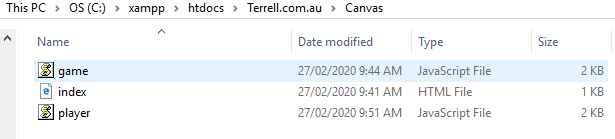
The folder structure of the game is as follows.
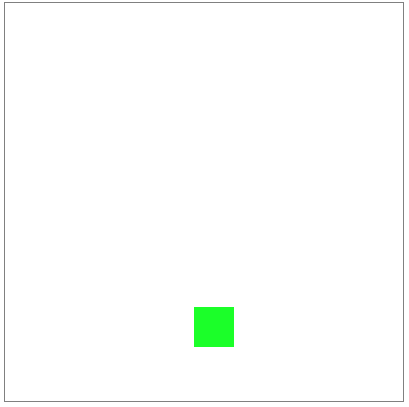
the game is of a Box canvas with a smaller coloured box as the player.
 Terrell Masters